
Sling Freestream is Sling TV’s free, ad-supported service for live channels and on-demand programming. In the United States and Puerto Rico, you can start watching without a subscription, credit card, or even a Sling account. The quickest route is to open watch.sling.com, select Stream Free, and choose a channel or title.
What is Sling Freestream?
Freestream is Sling TV’s free, advertising-supported streaming tier, often grouped with “free ad-supported television” services. It delivers live internet channels and an on-demand catalog, but it is separate from Sling’s paid Orange, Blue, combined, premium, sports, and international packages.
Sling currently advertises more than 600 free live channels and more than 40,000 on-demand movies and shows. Those figures and the programming itself can change, so use Sling’s current Freestream page and guide to confirm what is available.
Freestream is not a time-limited free trial. It is an ongoing free tier, although the lineup and individual titles are subject to change. Advertising is part of the service, so “free” does not mean ad-free.
#1 Best Overall
Sale

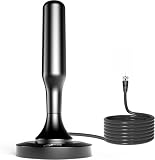
HIDB TV Antenna for Smart TV Indoor, Digital TV Antenna for Local Channels
- 𝗡𝗲𝘃𝗲𝗿 𝗣𝗮𝘆 𝗠𝗼𝗻𝘁𝗵𝗹𝘆 𝗕𝗶𝗹𝗹: Watching local channels with this HD digital tv antenna for smart tv indoor 4K, you can watch crystal HDTV channels without cable service and enjoy local tv channels.
- 𝗜𝗻𝗱𝘂𝘀𝘁𝗿𝘆 𝗟𝗲𝗮𝗱𝗶𝗻𝗴 𝗧𝗲𝗰𝗵𝗻𝗼𝗹𝗼𝗴𝘆: This digital indoor tv antenna for local channels is made of eco-friendly flame-retardant dual PC soft material (not ordinary PVC), providing moisture resistance and lightning protection for indoor use.
- 𝗢𝗺𝗶𝗻𝗶-𝗱𝗶𝗿𝗲𝗰𝘁𝗶𝗼𝗻𝗮𝗹 𝗥𝗲𝗰𝗲𝗽𝘁𝗶𝗼𝗻 & 𝗠𝗮𝗴𝗻𝗲𝘁𝗶𝗰 𝗕𝗮𝘀𝗲: The indoor HDTV antenna brings omini-directional Reception; Whether hd digital tv antenna indoor is installed on the TV stand or on the table, you can receive the crystal clear picture
- 𝗖𝗼𝗺𝗽𝗮𝗰𝘁 𝗮𝗻𝗱 𝘀𝗺𝗮𝗹𝗹 𝗗𝗲𝘀𝗶𝗴𝗻: The indoor antenna for tv without cable features a compact and slim design, making it easy to hide without taking up space. The lightweight build allows you to move it conveniently and adapt to different living environments effortlessly.
- 𝗡𝗼𝘁𝗲 𝗮𝗻𝗱 𝗖𝘂𝘀𝘁𝗼𝗺𝗲𝗿 𝗦𝗲𝗿𝘃𝗶𝗰𝗲 : Read the manual first, set up your TV properly, and scan for channels. 𝐅𝐨𝐫 𝐨𝐩𝐭𝐢𝐦𝐚𝐥 𝐫𝐞𝐜𝐞𝐩𝐭𝐢𝐨𝐧, 𝐭𝐞𝐬𝐭 𝐛𝐨𝐭𝐡 𝐯𝐞𝐫𝐭𝐢𝐜𝐚𝐥 𝐚𝐧𝐝 𝐡𝐨𝐫𝐢𝐳𝐨𝐧𝐭𝐚𝐥 𝐩𝐥𝐚𝐜𝐞𝐦𝐞𝐧𝐭. Mount the antenna high, near a window facing local broadcast towers (Check “dtv gov maps” for available channels), to avoid obstacles and interference. Actual Reception depends on location, terrain, and weather, always re-scan for channels after moving the antenna. If you have any issues, please contact us. We will provide professional service and a satisfactory solution for you.
How to watch without an account
- Open watch.sling.com or Sling’s Freestream page.
- Select Stream Free or Watch now.
- Browse the live guide or on-demand library.
- Select a channel, movie, or show to begin watching.
Basic viewing does not require an account or credit card. If the site asks you to sign in, look for the option to continue with Freestream rather than entering the paid-service signup flow.
Why create a free Sling account?
An account is optional, but it adds features that are unavailable in no-login mode. Depending on the current app experience, a free account can provide:
- Favorite channels
- Watchlists
- User profiles
- Parental controls
- Rewards and selected offers
- 10 hours of Freestream DVR storage
Choose Create an account or Sign up, enter an email address and password, and then select Freestream. Do not select a paid base package or enter billing information unless you actually intend to subscribe. Paid rentals and subscriptions are separate from free Freestream access.
How to watch on a computer
Use a current version of Chrome, Microsoft Edge, or Safari:
- Open the browser and go to watch.sling.com.
- Select Stream Free.
- Choose a live channel or on-demand title.
- Use the player’s full-screen control if desired.
If playback fails, update the browser and temporarily disable extensions that block scripts, advertisements, or video playback. Browser layouts and sign-in behavior can differ from the television app.
How to watch on a phone or tablet
Freestream is available through the official Sling TV app for supported iPhone, iPad, and Android devices.
- Open the Apple App Store or Google Play Store.
- Search for the official Sling TV app.
- Install and open it.
- Select Stream Free.
- Watch without signing in, or sign in to use account features.
You can watch directly on the mobile device or, where supported, cast from it to a television. Casting is different from installing the Sling app directly on a smart TV or streaming player.
Rank #2

TV Antenna for Smart TV Indoor, Digital TV Antenna for Local Channels
- 【TV ANTENNA FOR LOCAL CHANNELS】Our tv antenna can receive full HD channels like ABC,CBS,NBC,PBC, Fox and so much more. Supports 4K 1080p, and other digital formats.
- 【 LONG RANGE】This digital antenna for smart tv adopts newest Eco-friendly flame retardant double PC soft material (not other PVC material ) bring moisture and lightning protection to our indoor tv antenna.
- 【FULL HD CHANNELS】The digital TV antenna not only supports indoor and outdoor use but also can be used in bad weather. It is not affected by thunderstorms. Easily stick it on the wall and table/ use nylon to fix the antenna outdoors/ use screws to fix the TV antenna on the wall. Hang the TV antenna on a window or outdoors to help you get more stable and stronger signal reception.
- 【EASY SETUP】1. Connect the TV antenna to ‘CABLE-ANT IN’ on the back of any HDTV;2. Position the TV antenna – on the table, wall or window (strongly recommended);3. Scan for channels using your TV’s ‘Channel Search’ and enjoy free full HD TV,TV antenna no more need to pay a huge bill on TV.
- 【NOTE】: Upon receiving the TV antenna, assembly is required. Remember to remove the red rubber sleeve from the magnetic base and securely screw it onto the TV antenna linkage to complete setup.Our TV antenna comes with a 16.5 ft Long Cables.If you can’t search channels or only have few channels,please change TV antenna position and search again.Always remember to rescan the channel after moving the indoor TV antenna.For more information,you can visit “dtv gov maps”,and get useful information.
How to watch on a smart TV or streaming device
The general setup is the same across supported products: connect the television or player to the internet, open its app store, search for Sling TV, install the app, open it, and choose Stream Free. Compatibility depends on the exact model and operating-system version, not just the brand.
Roku
- From the Roku home screen, select Search.
- Search for Sling TV.
- Select the app and choose Add channel.
- Open Sling and choose Freestream.
Older Roku models may be unsupported. Sling’s Roku compatibility page lists model-specific exclusions, including models in the 2400X, 2450X, 2500X, 2700X, 3000X, 3050X, 3100X, 3400X, and 3420X ranges. Check the current Roku list before replacing or troubleshooting a device.
Amazon Fire TV
- Open the Fire TV home screen and select search.
- Search for Sling TV or Sling Television.
- Install the app.
- Open it and select Freestream.
Apple TV
- Open the Apple TV App Store.
- Search for Sling TV.
- Install the app.
- Open it and choose Freestream.
Android TV and Google TV
Open the Google Play Store, search for Sling TV, select Install, and open the app. Sling’s installation guidance uses the term Android TV; do not assume every Google TV or Android TV model is compatible without checking Sling’s current device list.
Samsung and LG smart TVs
On a compatible Samsung TV, press Home, open Apps, search for Sling TV, and select Install. On a compatible LG TV, press Home, search for Sling, then choose Install and Launch. Some supported LG televisions may already have the app installed.
Vizio SmartCast
Sling says the app is available from the SmartCast home screen on supported models, specifically noting 2016 and newer Vizio SmartCast TVs. Older or unsupported models may need a separate streaming player.
Chromecast
- Install the Sling TV app on a compatible phone or tablet.
- Connect the mobile device and Chromecast to the same Wi-Fi network.
- Start Freestream in the Sling app.
- Tap the Cast icon and select the Chromecast device.
Support can vary by Chromecast generation and Google TV model.
Xbox One
On a supported Xbox One, open the console’s app store, search for Sling TV, install the app, and select Freestream after launching it.
Rank #3

UltraPro Hover Digital TV Antenna Indoor for Smart TV
- GET FREE LOCAL CHANNELS WITHOUT CABLE — Watch news, sports and primetime in 1080p HD with this indoor TV antenna; no subscription required and ideal for cord-cutters or backup TV during cable, satellite or internet outages
- WORKS WITH 4K AND 8K TVs FOR CLEAR HDTV — UltraPro antenna supports modern 4K and 8K TVs while delivering over-the-air HD channels from major broadcast networks
- UP TO 40-MILE RANGE TV ANTENNA — Indoor HDTV antenna captures VHF and UHF signals up to 40 miles to improve picture quality and reduce signal dropouts
- HOVER DESIGN MOUNTS DISCREETLY TO TV — Unique hover-style antenna attaches directly to the top of your TV for a clean look; swivel horizontally to optimize positioning for improved reception
- EASY SETUP AND FLEXIBLE PLACEMENT — Install on top of your TV, place on a flat surface or mount to a wall with included mounting tape; low-profile design blends into any home theater setup; push-on coax connector enables fast, tool-free connection
Sling’s installation guide is the best place to verify current support before relying on a particular device.
What channels and shows are free?
The Freestream catalog includes categories such as news, classic entertainment, comedy, reality, game shows, drama, movies, and international or Latino programming. Sling’s examples have included ABC News Live, Aaj Tak International, Euronews, Al Jazeera Arabic, Noticias Univision 24/7, La Rosa de Guadalupe, and beIN Sports Extra.
These are examples, not a permanent channel list. A show may be available on demand but not live, and a channel included in a paid Sling package is not automatically part of Freestream. Local stations, ESPN, CNN, Fox News, regional sports, premium networks, and particular live events should never be assumed to be free. Check the current Freestream guide for your location.
DVR, profiles, and parental controls
Freestream includes DVR only for users with a free Sling account. The free allowance is 10 hours, and Freestream recordings expire after 30 days. It is not unlimited DVR and is separate from paid-subscriber allowances.
With an account, parental controls are available through Settings → Manage Content → Parental controls. Test the controls on each relevant device and profile, because behavior can vary by app and device.
Internet and equipment requirements
Sling states that 3 Mbps is the minimum for basic use. Its guidance also cites approximately 25 Mbps for households using multiple devices or needing more headroom. Another Sling page gives a higher single-computer estimate, so treat 3 Mbps as a minimum rather than a guarantee of smooth, high-quality viewing.
Buffering can still occur with a fast connection because of Wi-Fi congestion, latency, router placement, an aging device, browser extensions, or other household streams. Freestream requires an internet connection; it is not an antenna or cable-box service.
Rank #4

TV Antenna Indoor, Digital Amplified Indoor HDTV Antenna, 1080p VHF UHF Television Local Channels Detachable Signal Amplifier and 16.5ft Long Coax Cable
- Full HD Local Channels: Access over-the-air networks in your area, including local news, weather forecasts, sitcoms, kids, sports, and educational programs. Easily enjoy crystal clear digital & HD shows from major networks like ABC, CBS, NBC, Fox, and more without any monthly subscription fees.
- Optimized Signal Reception: Equipped with advanced reception technology supporting 720p, 1080i, 1080p, and 4K | ATSC formats. Vansky HDTV antenna captures stable digital signals within a reliable range, delivering high-definition visuals tailored to your local broadcast environment.
- Flexible Indoor Setup: Features a generous 16.5ft high-quality coaxial cable, allowing you to position the indoor antenna in the best signal spot—such as on a window or wall. Note: Obstacles like thick walls or valleys can affect actual reception; positioning closer to a window is highly recommended.
- Detachable Signal Amplifier: Includes an external signal booster to maximize reception for homes located further from broadcast towers. Pro Tip: If a stable signal cannot be locked with the amplifier on, simply remove the external booster and scan for channels again to find the optimal configuration.
- Safe & Durable Indoor Design: Specifically engineered for safe indoor utilization. Built with premium, flame-retardant materials to ensure long-term stability and durability, shielding your home entertainment setup against indoor environmental fluctuations.
Freestream versus paid Sling
| Feature | Freestream | Paid Sling service |
|---|---|---|
| Monthly subscription | No | Yes |
| Credit card for basic access | No | Generally required |
| Account | Optional | Required |
| Advertising | Yes | Depends on the content and plan |
| Channels | Free, limited/FAST lineup | Paid live-TV packages and add-ons |
| DVR | 10 hours with a free account; recordings expire after 30 days | Allowance varies by paid service |
| Local channels | Do not assume availability | Depends on plan and location |
| Sports and premium networks | Do not assume inclusion | Often requires a paid plan or add-on |
If Freestream lacks a channel you need, review Sling’s current service plans and add-ons. Prices and offers change, so verify them before subscribing.
Troubleshooting common problems
The app opens to paid content
Return to the app’s home screen and look for Stream Free, Freestream, or a free-content section. If the account state looks wrong, sign out and back in, update the app, and restart the device. You can also use watch.sling.com as a fallback.
Freestream is missing
Update Sling, restart the device, and confirm that the device model is supported. If the app still does not show the free tier, try a supported browser, phone, tablet, or casting method.
The stream buffers
- Run a speed test.
- Move closer to the router or use Ethernet where possible.
- Pause other downloads and streams.
- Restart the router and streaming device.
- Update the app, operating system, or browser.
- Try another network to isolate a local connection problem.
- Disable browser extensions that interfere with playback.
Do not upgrade your internet plan until you have ruled out weak Wi-Fi, router placement, device age, and software problems.
A channel or title is missing
Freestream’s catalog changes and can vary with geography and rights agreements. Check the current guide, and remember that paid Sling content is not automatically included in the free tier.
Account features do not appear
Favorites, profiles, watchlists, parental controls, rewards, and DVR require you to create and use a free Sling account. Basic no-login viewing does not include those features.
Who should use Sling Freestream?
Freestream is a practical choice if you want no-cost, ad-supported live and on-demand entertainment, news, reality programming, classic television, or casual viewing on a device you already own. It is also a low-risk way to explore Sling’s interface before considering a paid plan.
It is a poor fit if you need a complete cable replacement, a particular local station, a specific sports network or event, premium channels, dependable access to one named program, or ad-free viewing. In those cases, compare the current Sling lineup with your exact requirements—or consider an antenna for local broadcast channels, another free streaming service for a different catalog, or a paid live-TV service for broader sports and local-channel coverage.
Availability discussed here is U.S.-focused: Sling’s installation guidance says watching Sling TV requires the viewer to be in one of the 50 United States or Puerto Rico.
Product prices and availability are accurate as of the date/time indicated and are subject to change. Any price and availability information displayed on Amazon at the time of purchase will apply.
